How to Automate Blog Publishing: A Practical Setup Guide


Updated September 7, 2026
You can automate blog publishing by connecting a content plan, article generation and a CMS integration. The important distinction is between scheduling a draft that already exists and automating the work needed to create and publish it. Serpling handles keyword research, article generation and delivery to a connected publishing destination; you still own the editorial decisions and the result.
This guide walks through that workflow using Serpling's actual interface. Start with one test article and a staging destination before allowing software to publish unattended on your production website.
What do you actually want to automate?
If you already have approved articles, your CMS's own scheduling feature may be enough. If your bottleneck is researching topics, writing articles and moving them into the CMS, you need a connected workflow. An AI SEO agent adds those steps, but it should not be confused with an independent editor or a ranking guarantee.
| Workflow | What it removes | What you still do |
|---|---|---|
| CMS scheduling | Being online at publication time | Research, write, review and upload each article |
| AI writing plus manual publishing | Some first-draft work | Check the draft, format it and publish it |
| Serpling with a connected destination | Moving between keyword research, article generation and delivery tools | Choose suitable topics, configure the destination and check quality and outcomes |
How to automate blog publishing with Serpling
1. Define the audience before adding topics
Write down who the blog is for, the problem your product solves and the action you want a reader to take. For Serpling, a query about connecting an AI writer to WordPress is closer to the product than a query about finding a content-writing job. Both can have search demand; only one directly describes the workflow we sell.
In Settings, review the brand summary and custom instructions. Supply facts the writer can use: your actual features, limitations, supported integrations and preferred terminology. Do not ask it to invent customer quotes, original research or results you cannot substantiate.
2. Review the keyword list
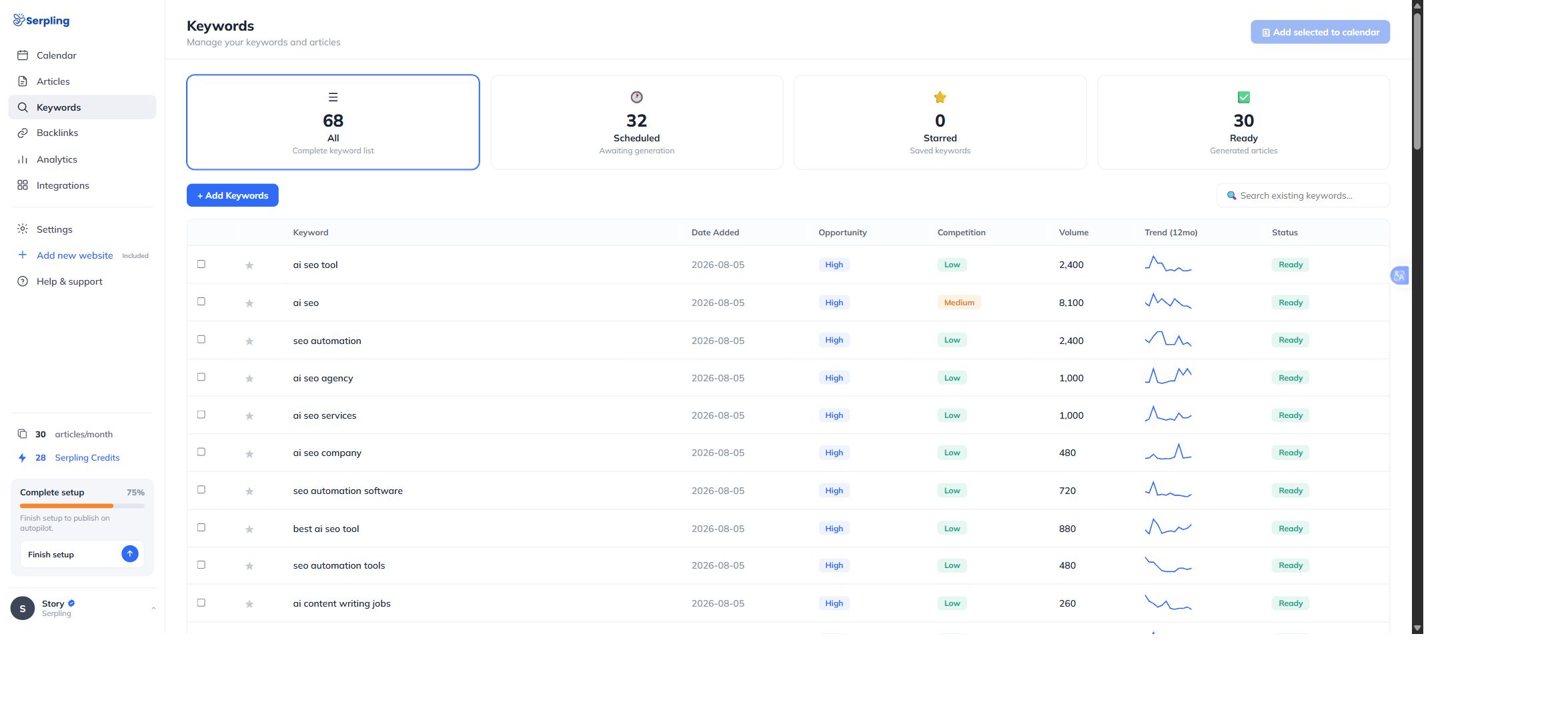
Open Keywords. Review the keyword, opportunity label, competition and volume together. Use Add Keywords for topics you already know matter, and inspect the credit cost before submitting research. Select suitable keywords and use Add selected to calendar to plan them.
A search-volume estimate is not a visitor forecast. Check the searcher's intent, whether an existing page already answers the question, and whether you can contribute something useful. An unfamiliar or missing metric needs investigation; it is not proof that a topic has no audience.
3. Connect a destination you can safely test
Open Integrations and choose a supported destination. For WordPress, the connection asks for the website URL, a WordPress username and an application password. Use a dedicated publishing identity with only the permissions needed. Do not paste your main administrator password into a workflow document or share it with collaborators.
For a custom website, a homepage URL is not a publishing endpoint. A developer must provide a route that accepts the article payload, verifies the signature where applicable, stores the article and returns the expected JSON acknowledgement. Check the current integration requirements before assuming your platform is supported.
4. Check the schedule and automatic-publication behavior
Open Calendar to inspect scheduled topics and dates. Check for repeated topics before adding more. A scheduled item is a plan, not evidence that a page is live.
Important: Serpling's generation workflow can publish to the connected destination automatically. Do not assume that every generated article waits behind a manual approval button. If your organization requires pre-publication sign-off, use a staging destination or a receiver that holds content as drafts and verifies that behavior before production use.
5. Verify one complete article before expanding
For the first test, check the article in Serpling and on the destination website. Confirm the title, body, cover image, mid-article image and internal links. Open the final URL in a signed-out browser. Confirm that the page is readable, the images load and the destination really received the post. Retrying a failed request without checking the CMS can create duplicate work.
Which CMS integrations are available?
At this review, Serpling's integrations page marks WordPress, Shopify, Next.js, Framer and the generic webhook as live. These do not all use the same connection method.
| Destination | Connection | Check before publishing |
|---|---|---|
| WordPress | REST publishing with an application password | User permissions, media uploads and SEO-plugin metadata |
| Shopify | Store blog integration | Store authorization and the correct target blog |
| Next.js or Framer | A signed endpoint you configure | Signature validation, article storage and the live URL |
| Other custom stacks | Generic JSON webhook | Your receiver implements the publishing and acknowledgement |
| Webflow, Ghost, Wix, Contentful | Native integrations marked planned | Do not assume a native connector exists; assess a custom receiver separately |
A short quality gate for automated posts
- Intent: does the article solve the question in its title, with specific steps or examples?
- Accuracy: verify product capabilities, prices, names and source links. Remove invented experience or results.
- Original value: add a real screenshot, tested workflow, useful checklist or explanation that a generic draft would miss.
- Page health: check the public URL, canonical, indexability, images and mobile layout.
- Reader's next step: link naturally to the relevant product, integration or supporting guide.
Google's guidance on generative AI content emphasizes accuracy, quality and relevance. Automation does not exempt pages from those standards, and publishing more pages does not guarantee more search traffic.
What if automatic publishing fails?
First identify the failed stage: research, article generation, image generation, or CMS delivery. Keep the error message and check the destination before retrying. Reconnecting credentials will not fix a failed image job; rewriting the article will not fix an invalid webhook URL.
- No live page: inspect the article status and destination response instead of treating a calendar entry as success.
- Missing images: check both image URLs and whether the CMS accepts the file type and upload permissions.
- Webhook returns HTML: verify that you used an API endpoint, not your site's homepage.
- Formatting differs: test headings, tables and images in the destination theme.
Measure the published pages, not just the publishing count
Record the publication URL and date, then inspect that page in Google Search Console. Compare its queries, impressions, clicks and positions over consistent periods. Separate branded searches from discovery searches. If a page ranks far below the first results, changing only its snippet is unlikely to address the main problem.
Link useful articles from related pages so readers can find them. For a separate view of backlink data, use the domain backlink-authority checker; its third-party score is not a measure of article quality or a replacement for Search Console.
Frequently asked questions
Can I automate publishing without an AI writer?
Yes. If the article is already written and approved, CMS scheduling may solve the problem. Use a broader system when topic research and article production are also bottlenecks.
Does automatic publication guarantee Google indexing?
No. Publication makes a page available. Crawling, indexing and ranking are separate processes; inspect the final URL and investigate specific issues rather than assuming every live post is indexed.
How often should I publish?
Choose a pace you can support with useful topics and quality checks. Start with a small batch, inspect the results and only then increase the workload.
Ready to assess the workflow? Check your publishing destination, then try Serpling. Confirm the behavior on a test destination before enabling unattended publication.